







PreFrame

Your shot list isn't a list.
It's a timeline.

For filmmakers who feel the music and the story first

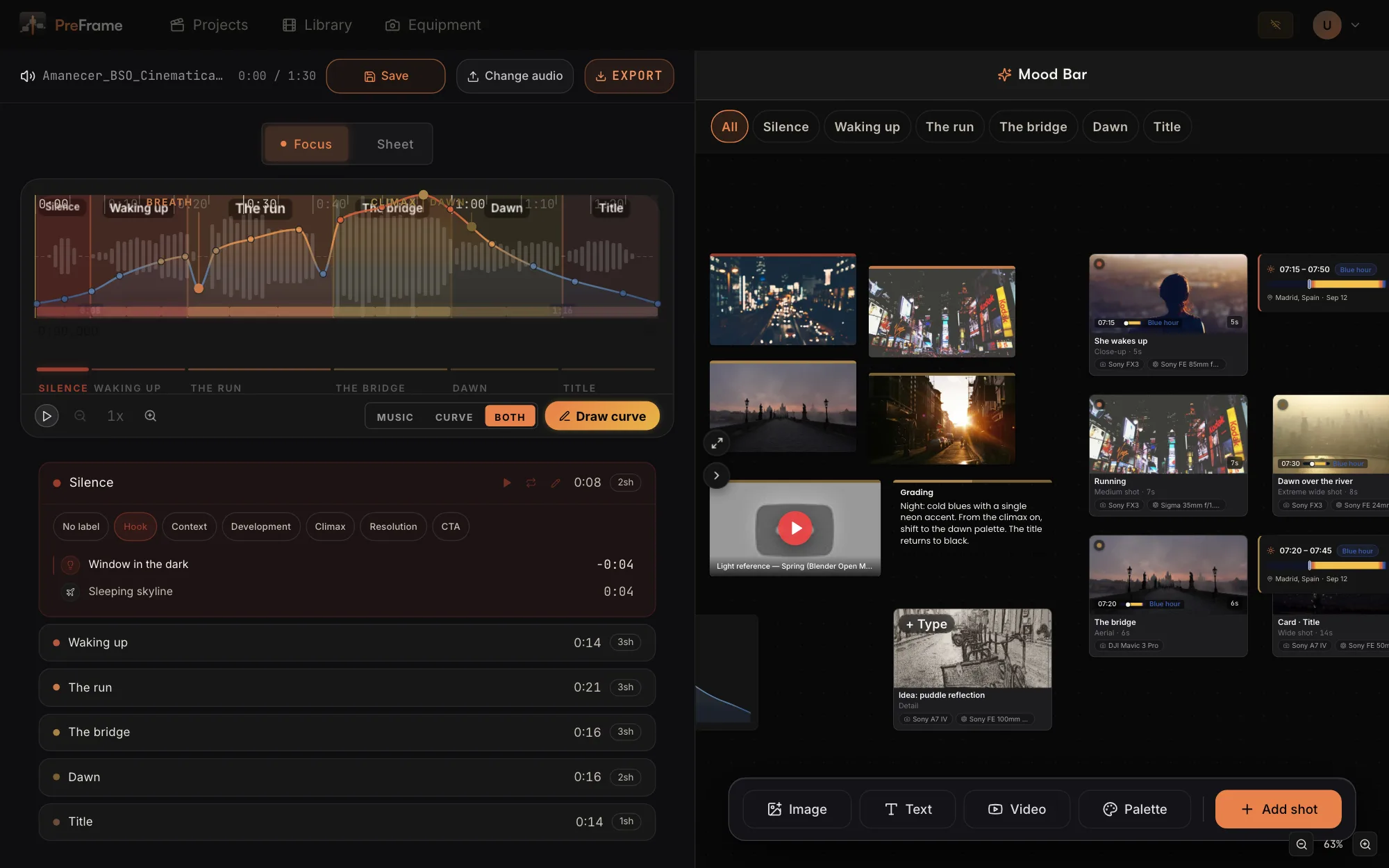
PreFrame editor showing the Amanecer demo project: colored narrative sections over the waveform, an emotional curve drawn on top, the shot list below and the Mood Bar canvas on the right.

What PreFrame is

PreFrame helps you plan the next story you want to tell — whether you already know the song, or you don't yet.

If you have the track, drop it in and feel it: a focused mode strips away everything else so you can listen, sense where the shots live, and mark cuts as you go. If you don't have it yet, sketch the shape of the piece as you imagine it and build the story around that instead.

Either way, switch to a structured mode to turn what you felt — or imagined — into a real plan: section by section, shot by shot. A moodboard runs alongside you through it all, so the look of the piece never gets lost. And when the real track finally lands, neither does your plan.

The Mood Bar

Half timeline, half mood board.
All one project.

References, video, notes, palettes — even the curve itself — on a canvas that lives beside your timeline and filters by section.

  • Reference images
  • Video & YouTube
  • Written notes
  • Palettes with hex
  • The emotional curve
  • Filter by section
  • The track, always in reach
Two substrates, one timeline

Draw the feeling.
Right over the track.

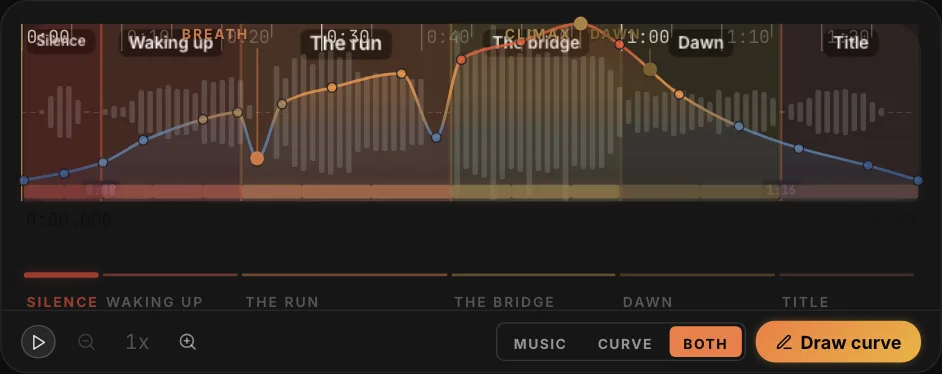
When you feel the music first, the song becomes your canvas. When the track isn't here yet, you draw the emotional curve by hand — and lay one over the other when it lands. The switch says it all: Music · Curve · Both.

The PreFrame timeline with the substrate switch: a hand-drawn emotional curve, colored from blue to orange by intensity, drawn directly over the waveform and its narrative sections.
Export

Leave with the cut already mapped.

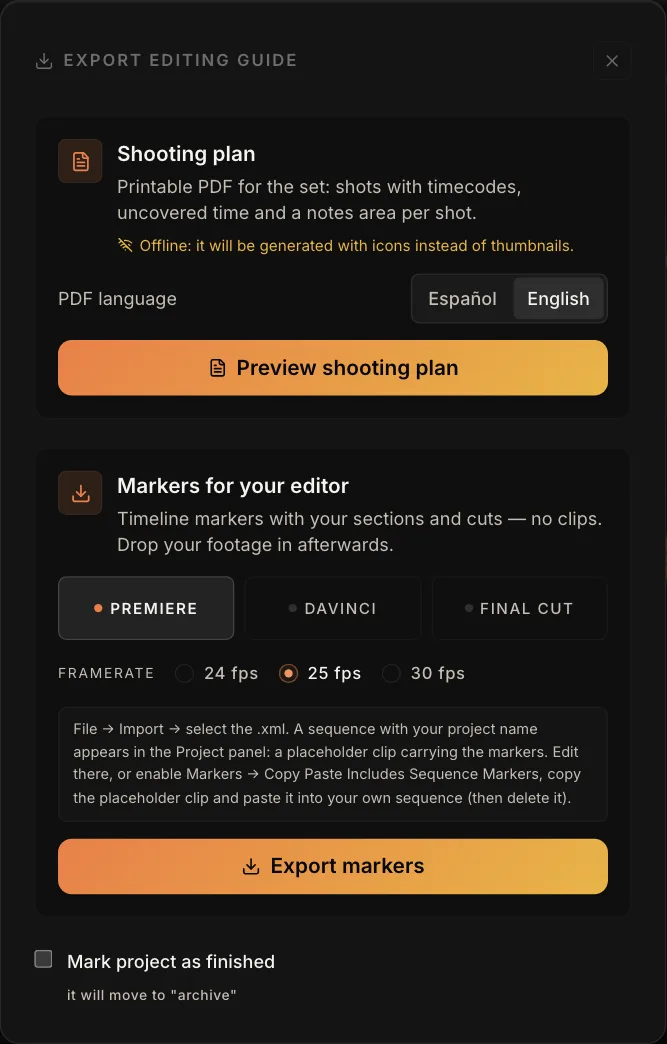
One dialog, two deliverables: a printable shooting plan with your shots, timecodes and uncovered time — and your sections as timeline markers for Premiere or DaVinci Resolve, at 24, 25 or 30 fps.

PreFrame's export dialog: a printable shooting plan, and section markers for Premiere or DaVinci Resolve with selectable frame rate.
PreFrame in Sheet mode: a light spec-sheet view of the same project, with the emotional curve over the waveform, numbered section cards, and the mood panel with palette and reference images.
Focus & Ficha

One project.
Two states of mind.

Focus is the dark room: you, the track and the timeline. Ficha turns the same project into a bright spec sheet — sections numbered, notes visible, every shot laid out to review before the shoot.

Track or no track

Start with the song.
Or before it exists.

Some projects begin with the .mp3 in hand. Others begin as a feeling, long before the music lands. PreFrame plans both.

The track came first

Drop the song in and cut it into narrative sections, right on its waveform. Every shot sits on real seconds — the chorus is exactly where the chorus is.
The track isn't here yet

Draw the emotional curve you want the film to follow, and cut your sections on it. Planning starts when the idea does — not when the delivery arrives.

And the day the track lands, they meet: Music · Curve · Both.

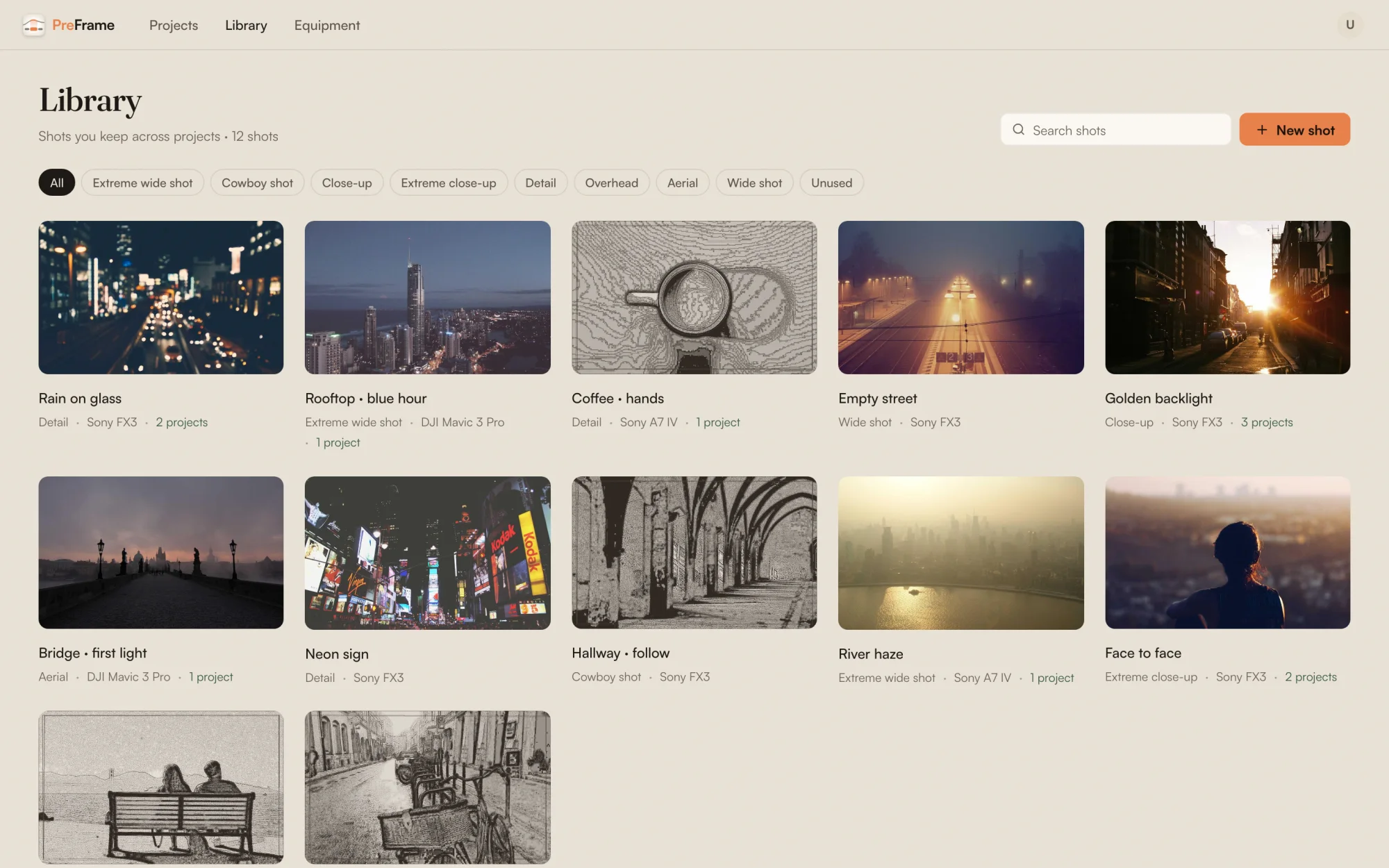
PreFrame's shot gallery: a grid of shot cards with durations and lens chips — Window in the dark, She wakes up, Running, The bridge — filterable by narrative section, with search.
Shots & gear

Describe a shot once.
Shoot it forever.

Every shot carries the film vocabulary — wide, medium, close-up, overhead — plus your camera, your lens, a thumbnail and its notes. Save it to your library and drop it into the next project with the gear already attached.

Everything else it does

The parts of a shoot nobody else models.

Golden hour, per shot

The light for that place, that day — attached to the shot itself. You'll know before you scout whether it's possible.

Nothing leaves your machine

Your track and your references never get uploaded. Open the app on a mountain with no signal and keep working.

On set

Print it. Take it. Tick it off.

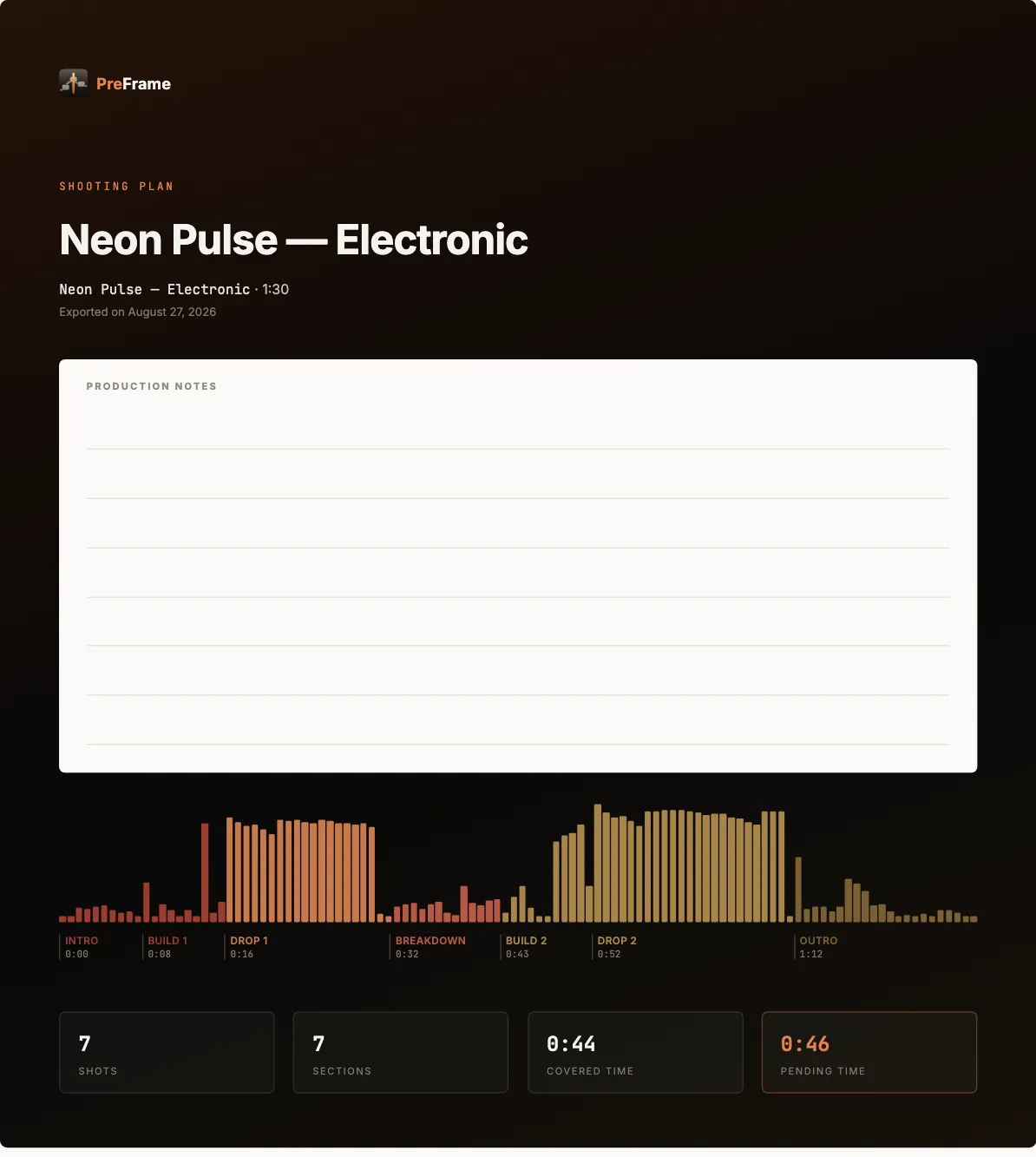
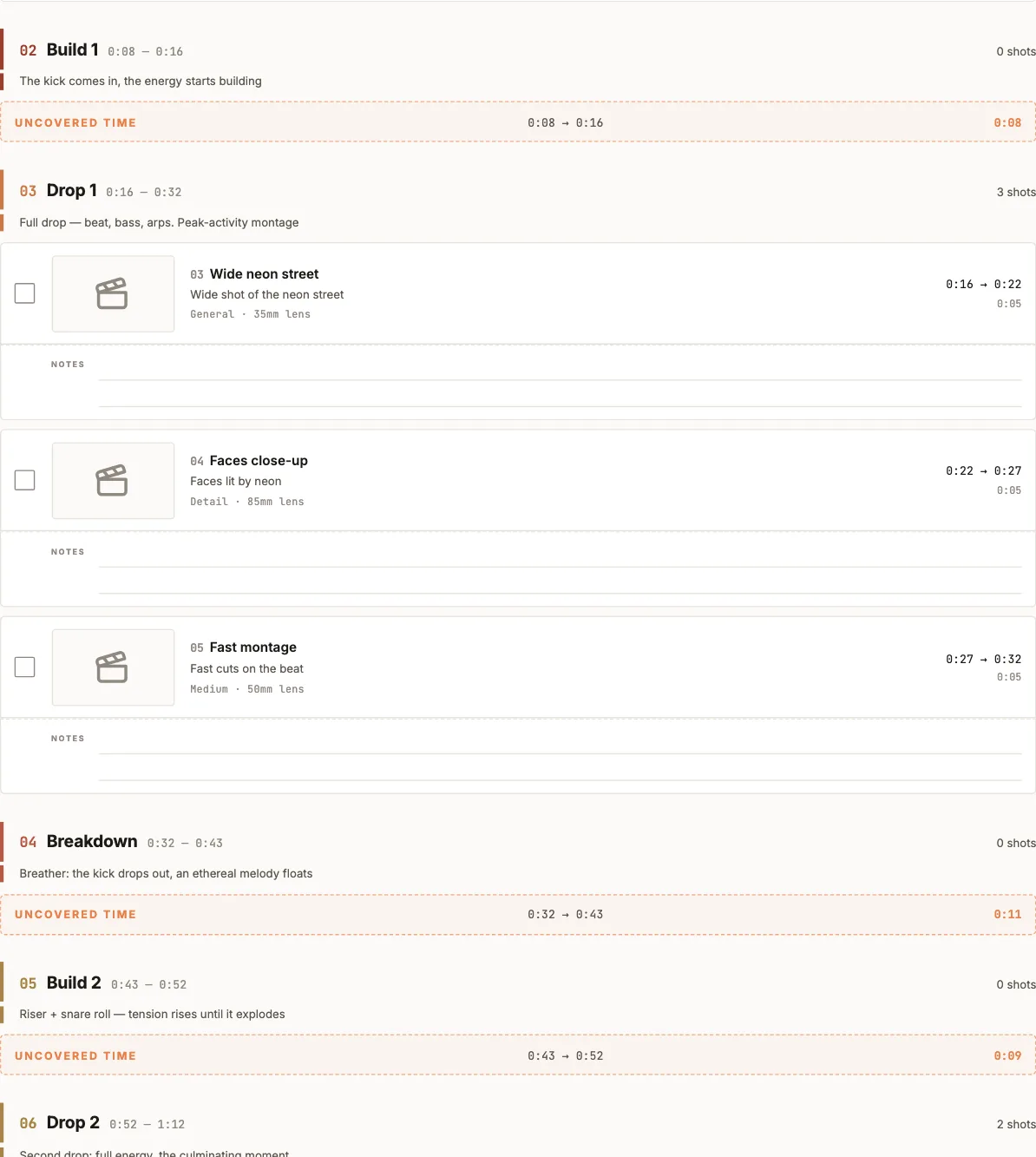
A shooting plan with every shot, its timecode, a box to tick between takes and blank lines to write on. Uncovered time is calculated and printed — nobody discovers the hole at 6pm.

This is the actual document the app generates — cover and pages straight from the demo project.

A page of the real shooting plan PDF: shot cards with timecodes and tick boxes, blank note lines, and a highlighted UNCOVERED TIME row between 0:08 and 0:16. Cover of the real shooting plan PDF: project title and duration, a production-notes box, the waveform cut into sections, and the counts of shots, sections, covered and pending time.
Who made this
Alberto, the creator of PreFrame, looking up

Behind PreFrame

I'm Alberto: a programmer by trade and by hobby — coming up on a decade building software — and a filmmaker purely for the fun of it: I film my own travels :). PreFrame comes from realising that filmmakers have no dedicated place to bring our ideas to light: inspiration lives in scattered notes, gear in lists, timing in spreadsheets. PreFrame is that place, and it grows by listening to what filmmakers of every level need — hobbyist to pro.

Alberto — programmer and hobbyist filmmaker, building PreFrame

Pricing

One credit is one project.

No subscription. A credit is spent once, when you create a project. Everything you do inside it — add the track, redraw the curve, relocate the same file, export and re-export — is free and unlimited, forever.

Start here
Free

Your first project, complete.

  • Waveform or emotional curve
  • Mood board and shot cards
  • EDL export and shooting PDF
  • No card required

Planning more than one project? Packs bring the credit down.

Single
19.99 €

one credit · one project

The reference price

Pack of 3
49.99 €

16.66 € per credit

Save 9.98 € vs buying them one by one

Pack of 10
129.99 €

13.00 € per credit

Save 69.91 € vs buying them one by one

Credits never expire, and everything inside a project stays unlimited and free whichever way you buy. Credits are bought inside the app. Savings are compared against buying single credits at 19.99 €; packs have never been sold at a different price.

Founder price available to the first 100 buyers or for six months, whichever comes first. After that the price goes to 19.99 €. Payments are processed by Stripe (the seller of record). See the full pricing page →

Think in rhythm.
Think in emotion.
Then shoot it.

v0.3.3 · 127 MB · Signed and notarized by Apple. macOS 12+, Apple Silicon. Windows has no date yet.