Golden hour doesn't wait: how to plan every shot around the light
Golden hour lasts less than you think and happens once a day. How to find the light windows for your location and date, attach one to each shot, and find out at home — not on location — that three of them collide.
You can reshoot a take. You can move a tripod. You cannot move the sun, and the light you planned the shot for is there for about forty minutes, once, and then it's gone until tomorrow — if you're still there tomorrow.
Most shoots lose their best shot not because nobody knew golden hour mattered, but because nobody wrote down when it was, where it would be needed, and how many shots were counting on it at the same time.
The day has six kinds of light
Forget "morning" and "evening". For planning, a day divides into windows, and each one does a different job:
| Window | When | What it's good for |
|---|---|---|
| Night | Sun well below the horizon | City lights, neon, anything that glows on its own |
| Blue hour | ~20–40 min before sunrise and after sunset | Cool, even, shadowless. Skylines, silhouettes, the quiet opening |
| Golden hour | The first and last ~hour of sun | Warm, low, directional. Faces, backlight, the shot everybody wants |
| Morning light | After golden hour until late morning | Clean and soft enough. Most of your usable day |
| Daylight | Around midday | Hard and flat from above. Interiors, shade, details — or nothing |
| Afternoon light | Mid-afternoon until golden hour | Warming up, long shadows starting |
Those durations are for mid-latitudes. Near the equator the good windows are brutally short; far north in summer, golden hour can last for hours. Which is exactly why you look it up instead of assuming.
Three things decide the windows
Where. Not the country — the place. Sunrise behind a mountain arrives late; a street running east–west gets golden hour down its length and a street running north–south gets it on one wall.
When. The date, not the season. Sunrise moves by more than a minute a day in spring and autumn. A plan made three weeks ahead with "sunrise is around seven" is wrong by twenty minutes.
Which way you're facing. Light behind the subject and light on the subject are two different shots at the same minute. Write the direction in the shot's notes.
Any sun calculator gives you the first two. Write down, for each shooting day: blue hour start, sunrise, end of morning golden hour, start of evening golden hour, sunset, end of blue hour. Six times. That's the clock your shoot actually runs on.
Attach a window to every shot that needs one
Go through your shots and mark the ones where the light is the shot. Not all of them — a detail of hands on a table doesn't care. But the skyline, the backlit walk, the face at the window do.
For each of those, write the window next to it: "blue hour, 07:15–07:50". Now it isn't "a nice shot of the bridge". It's an appointment.
Then look for collisions
This is the step that saves the shoot. Sort the light-dependent shots by window, and count:
- Two shots in the same 35-minute window, in the same place? Fine.
- Three shots in the same window, in three different places? You're getting one of them. Decide now which, and move the others to another day or the other end of the day — evening golden hour is as good as the morning one, and nobody schedules it.
- The window plus the walk. A blue hour shot at the top of a hill starts with a walk in the dark. Put the travel on the plan too.
You plan a video in the order of the song. You shoot it in the order of the sun. The list you take on location should be sorted by clock time, with each shot's place in the song written next to it, so it finds its way back in the edit.
The same thing in PreFrame
In PreFrame the light lives on the shot itself. For a place and a date you get the whole day as one bar — night, blue hour, golden hour, daylight — with sunrise and sunset on it, and the window the shot needs is marked on that bar with the name of its light.
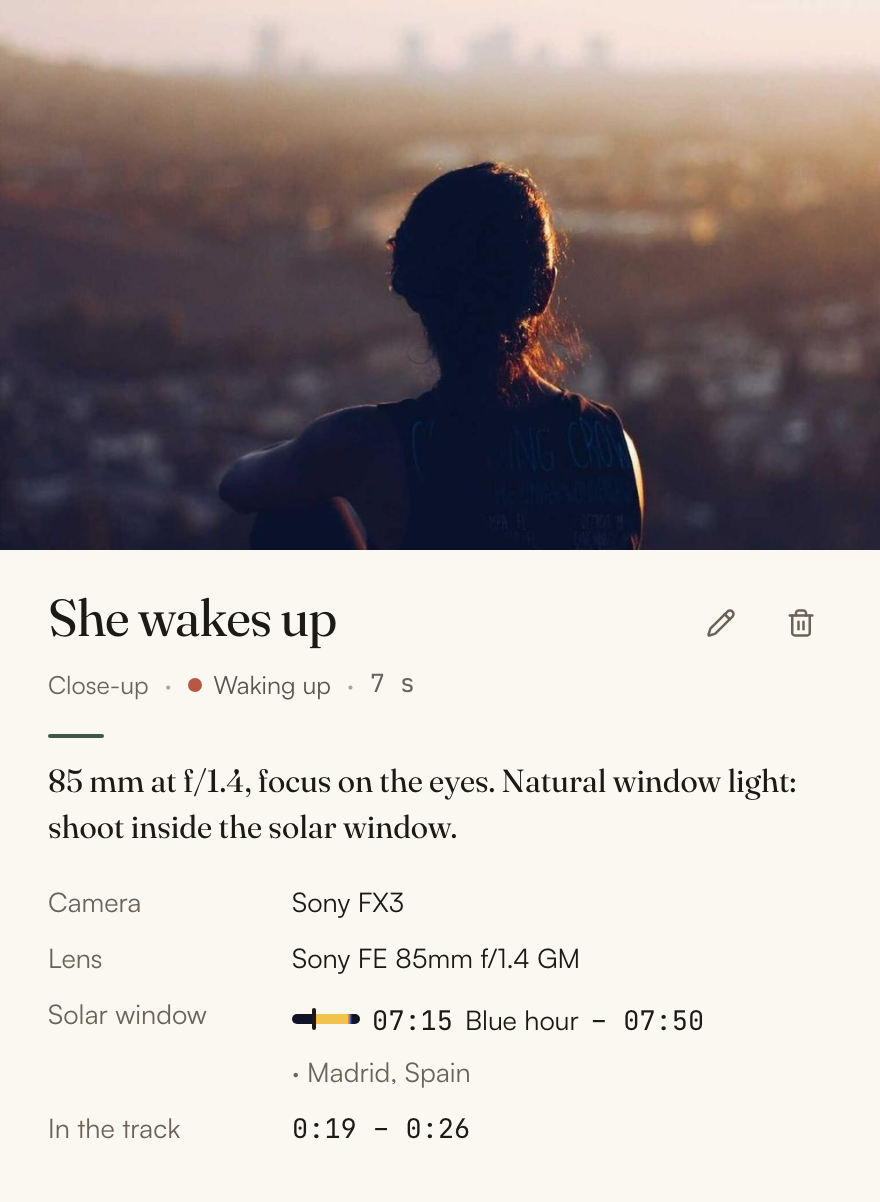
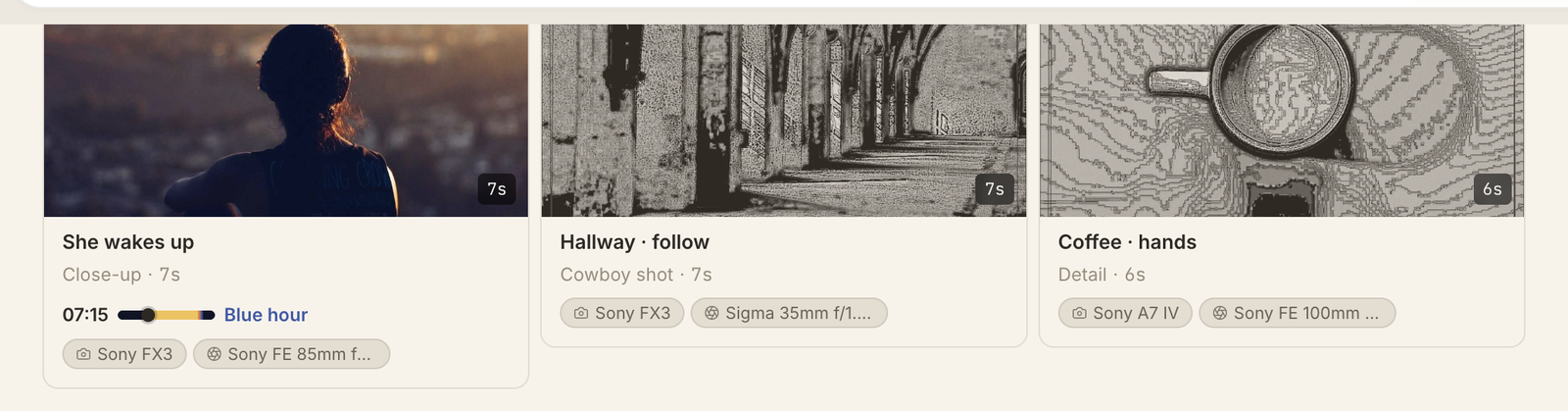
The window stays with the shot: it sits on the shot itself, next to the camera and lens, so reading along a section you see which shots have an appointment with the sun and when. Shots that share a morning share the window, set once for all of them.
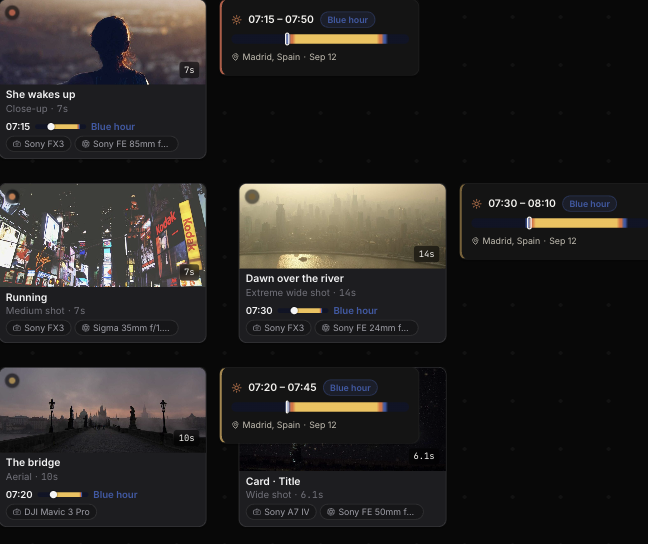
You find out at your desk, not at the foot of the hill at 07:10, that the morning only has room for one of them. It works offline too, from coordinates, and can be recalculated for the real location once you're back online. How solar time works in detail is covered in support; if you're planning a trip, the rest of the method is in how to plan a travel film to music.