How to cut a song into narrative sections
Before you can plan shots against a song, you need to know where it changes. Three listens, a handful of timestamps and a name for each part — no music theory required.
Every guide on editing to music tells you to "cut on the beat". That is advice for the edit, and it is too small to plan with. A three-minute song has four hundred beats. You can't plan four hundred of anything.
What you can plan with is sections: the five to seven blocks a song is made of. Each one has a different energy, and each one wants a different kind of image. If you know where they start and what each one is for, you know how many shots you need, what kind, and in what order — before you've picked up the camera.
You don't need to read music to find them. You need to listen three times.
What a section is
A section is a stretch of the song where the energy stays roughly the same. It ends when something changes enough that you'd want the picture to change too.
The things that mark a change are easy to hear once you're listening for them:
- Something enters — the drums come in, the voice starts, a second guitar.
- Something leaves — everything drops out except a piano; the beat stops for a bar.
- It opens up — the chorus: louder, wider, more voices.
- It turns — a bridge that sounds like a different song for a moment.
- Silence. A gap is a section boundary, always. It is also a gift: silences are cuts.
Three listens
First listen: hands off. Eyes closed if you can. No pausing, no notes. You're only finding out where you react — where you sit up, where you relax. Those moments are the ones your audience will feel too.
Second listen: mark the changes. Play it again with a timer visible and note the second each time something from the list above happens. Don't judge, don't name. You'll get more marks than you need; that's fine.
Third listen: merge and name. Now be strict. Two marks four seconds apart are one change, not two. A change you can hear but wouldn't cut the picture on isn't a section boundary. What survives is your list.
How many is right? Fewer than four and you're only marking "quiet part, loud part" — too coarse to plan shots against. More than eight and you're marking phrases, not sections. For a two- to four-minute song, five to seven is almost always the answer.
A sanity check with numbers
Songs are built in blocks of 4 or 8 bars, so sections tend to have regular lengths. If you know the tempo, you know those lengths:
Seconds per bar = 240 ÷ BPM (for the usual four beats to a bar)
At 120 BPM a bar lasts 2 seconds, so an 8-bar section is 16 seconds and a 16-bar one is 32. At 90 BPM, 8 bars are about 21 seconds.
You don't need this to find the sections — your ears do that. It's useful afterwards: if your sections come out at 16, 16, 31, 17 and 32 seconds, you've found the real structure. If one comes out at 11, you've probably cut in the middle of a phrase; listen to that spot again.
If you can see the waveform, use it too. Section changes usually look like changes: the block gets denser, thinner, or stops.
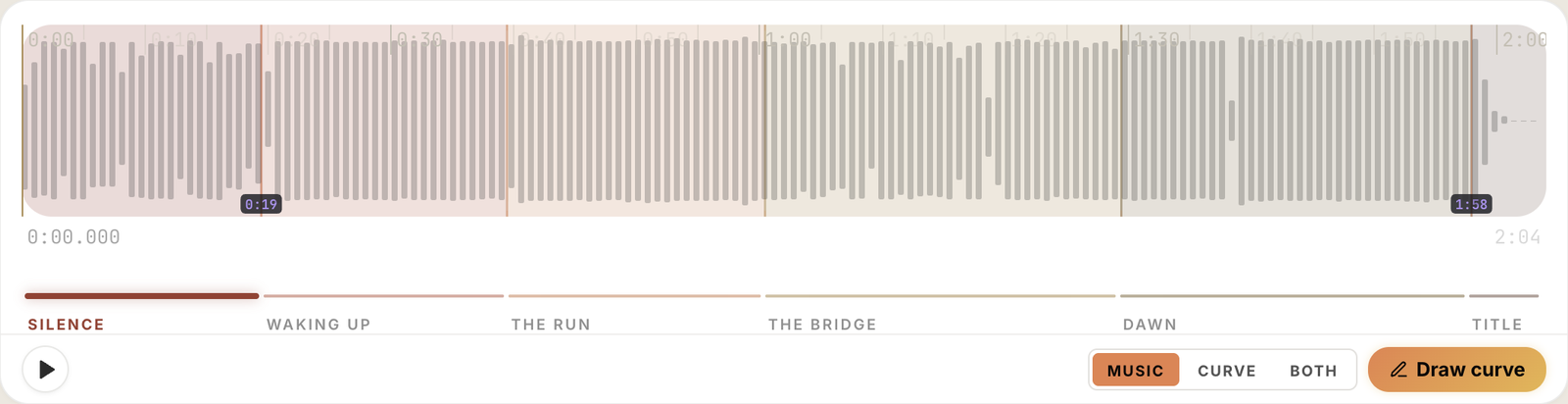
Name them for the film, not for the song
"Verse 1, chorus, verse 2" describes the song. It tells you nothing about what to shoot. Rename each section for what it does in your piece.
It helps to think of each section as having one of a few jobs:
| Job | What it does | What it usually looks like |
|---|---|---|
| Hook | Earns the next ten seconds | One strong, quiet image. Little movement |
| Context | Says where we are and who this is about | Wides, establishing shots, faces |
| Development | Things start moving | Travel, action, shorter shots |
| Climax | The reason the piece exists | Your best footage, fastest cutting |
| Resolution | Lets the audience breathe | Longer takes, last light, stillness |
| Closing | Title, credits, sign-off | One shot, or black |
Not every song uses all six, and some use one twice. The point is that every section gets a job, and no two neighbouring sections get the same one — if they do, they were probably one section.
Then give it a name you'll recognise on location: not "Development" but "The run". Not "Climax" but "Dawn".
When the song doesn't have a chorus
Instrumental tracks, ambient pieces and film scores don't follow verse-and-chorus, and they're the ones people most often use for travel and wedding films. The method is the same; you just follow energy instead of structure. Mark where it rises, where it holds, where it falls. A score that builds for ninety seconds and then releases is three sections — rise, peak, release — even if nothing ever repeats.
What you end up with
A short table. This is the whole deliverable:
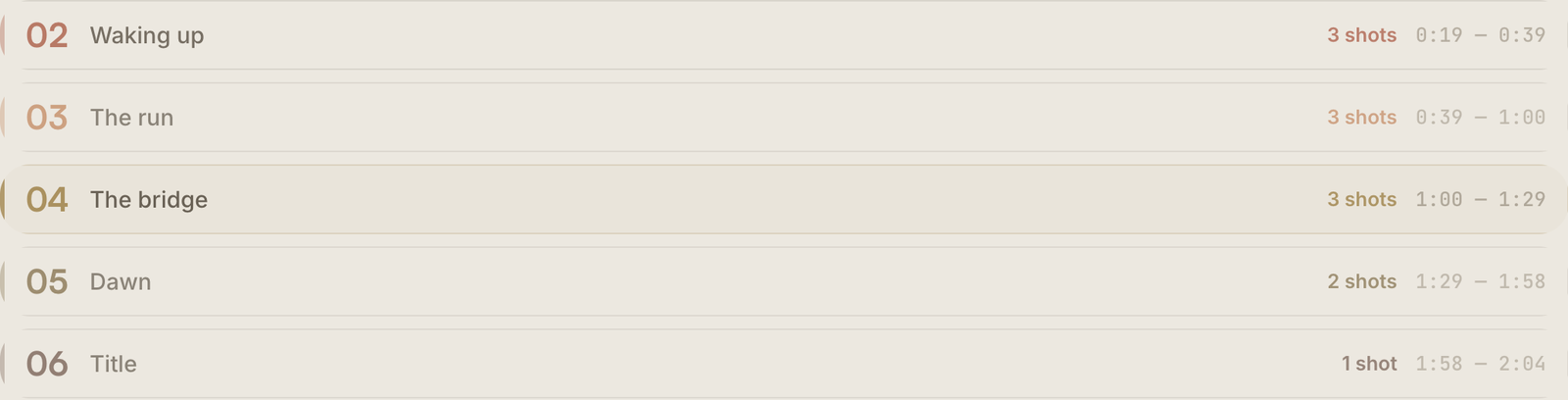
With it you can work out how many shots each part needs — a section's length divided by how long each shot stays on screen — which is the step covered in how to plan a travel film to music. And when you get to the edit, those same start times become markers on your timeline: here's how, for Premiere, DaVinci Resolve and Final Cut.
The same thing in PreFrame
In PreFrame you do this on the waveform itself, with the song playing: each cut lands on the real second where you heard the change, and a cut that came in late is as easy to take out as it was to make. Any section can loop on its own, so you can check it starts where you think it does.
Each section gets a name and one of those narrative jobs as a label, which shows next to its name as a coloured dot and a word.
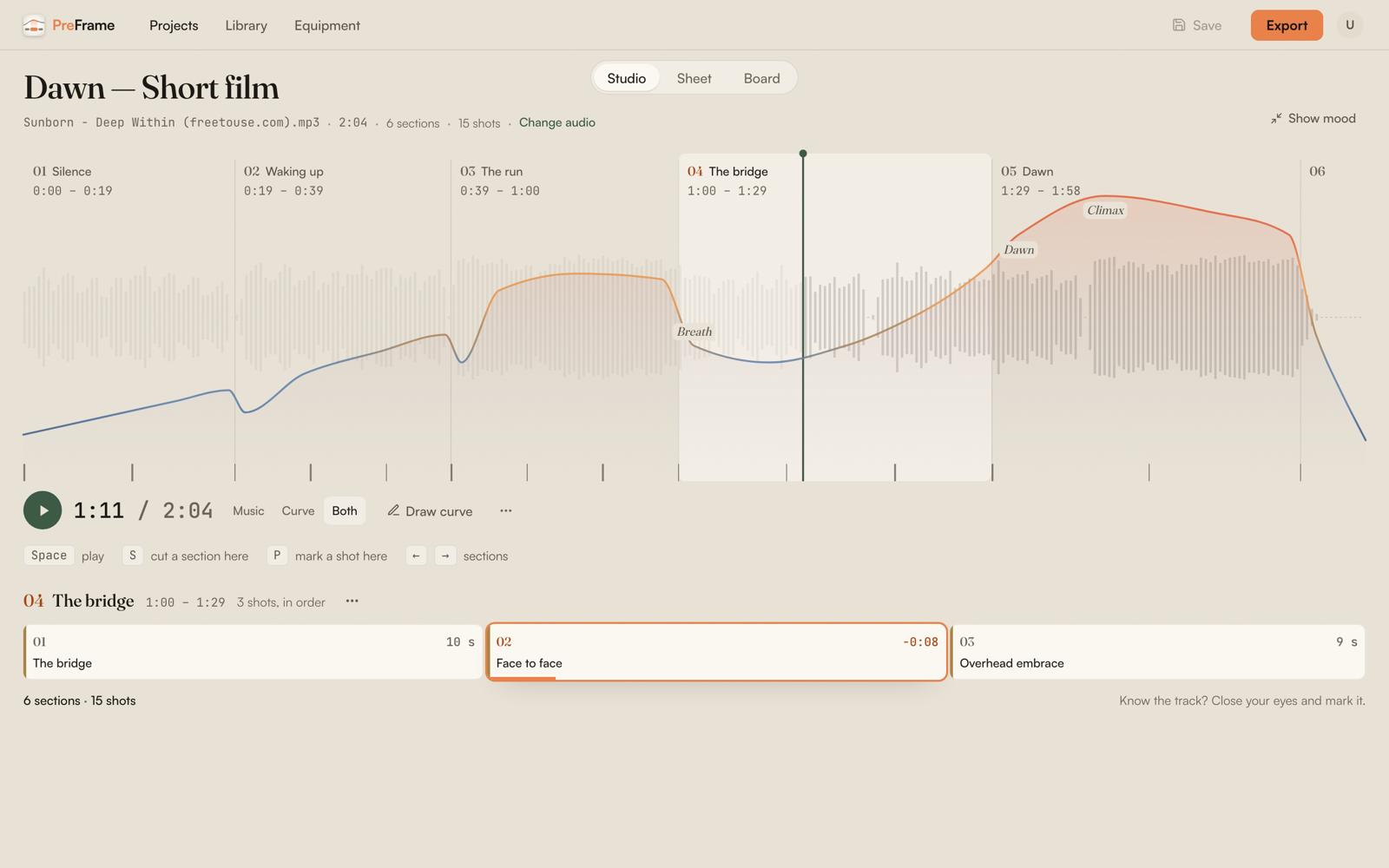
And if the music doesn't exist yet — the composer is still writing, or you haven't chosen — you can draw the emotional curve of the piece by hand and cut your sections on that. The day the track arrives, you lay one over the other.